---
title: "Remove a video background"
description: "Cut a person or any object out of a clip or picture so titles can pass behind them: in the Studio app with a right-click, or free on your computer with one command."
sidebarTitle: "Remove background"
---
import { DocsVideo } from "/snippets/docs-video.jsx";
Cut a person out so titles can pass behind them, lift an object out of a shot, or replace what's behind. The basic
cut-out runs on your computer: no upload, no account, no cost.
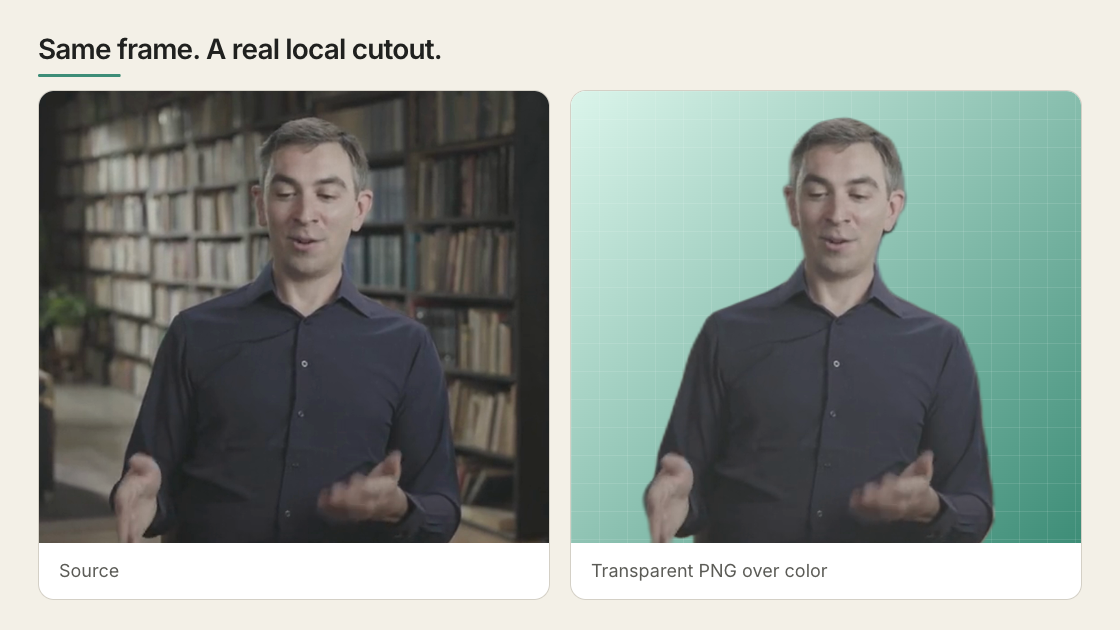
*A presenter cut out of a real room, with the hard edges (hair, a shoulder a plant overlapped) magnified.*
## In the Studio app
Right-click a video or picture in the preview:
- **Cut out object here** lifts out whatever you clicked, a person or a thing. On a video it follows that object
through the clip. Shift-click adds to the selection; on a picture, **B** brushes the edges.
- **Remove background** keeps the person and drops the rest. It's free and runs on your Mac, made for people on plain
backgrounds. With a HeyGen API key you can choose a cloud cut through HeyGen instead, paid from your API balance.
Or just ask: "put the title behind her", "remove the cup from the table", "put her on a rainy street at night".
## On the command line
```bash
npx hyperframes remove-background subject.mp4 -o subject.webm
```
The first run downloads the model; it needs FFmpeg. Pick the output by where it goes: `.webm` for HyperFrames and the
web, `.mov` (ProRes 4444) for Premiere, Resolve or Final Cut, `.png` for a single photo.
For text behind the person, make the cut-out and a background plate with a person-shaped hole in one pass, then
stack: plate, your text or graphic, cut-out on top.
```bash
npx hyperframes remove-background subject.mp4 -o subject.webm --background-output plate.webm
```
 ## When it works, and when it won't
The free model is made for people: a clear subject, steady framing, some contrast with the background. Expect trouble
with a held object (a dark mic or phone can vanish), fine hair over a busy background, and fast motion. For objects,
use **Cut out object here** in the app instead.
## Fixes, quality and speed
| Problem | What to check |
| --------------------------------- | ----------------------------------------------------------------------------------------------- |
| The background is still opaque | Confirm the output is transparent WebM, MOV, or PNG and preview it over a colored background. |
| Edges flicker | Use a cleaner source, reduce fast movement, or use a stronger external matting tool. |
| Processing is slow | Check `--info`; CPU processing works but is much slower than an available accelerated provider. |
| The subject has a color halo | Use `--quality best`, especially when layering over the original source. |
| The “background plate” has a hole | Expected: it is inverse alpha, not an inpainted clean plate. |
| Part of a held object is missing | The model matches people, not what they hold. Use another matting tool for that shot. |
`--quality best` for a cut-out over its own original footage, `fast` for a smaller file over something unrelated;
`--info` shows whether a fast local processor was found. To move the cut-out, animate a wrapper around the video,
not the video itself. Every flag is in the [CLI reference](/packages/cli#remove-background).
## Related topics
- [Add an AI avatar presenter](/guides/avatar-presenter)
- [Use images and video](/guides/video-components)
- [Apply media effects](/guides/media-effects)